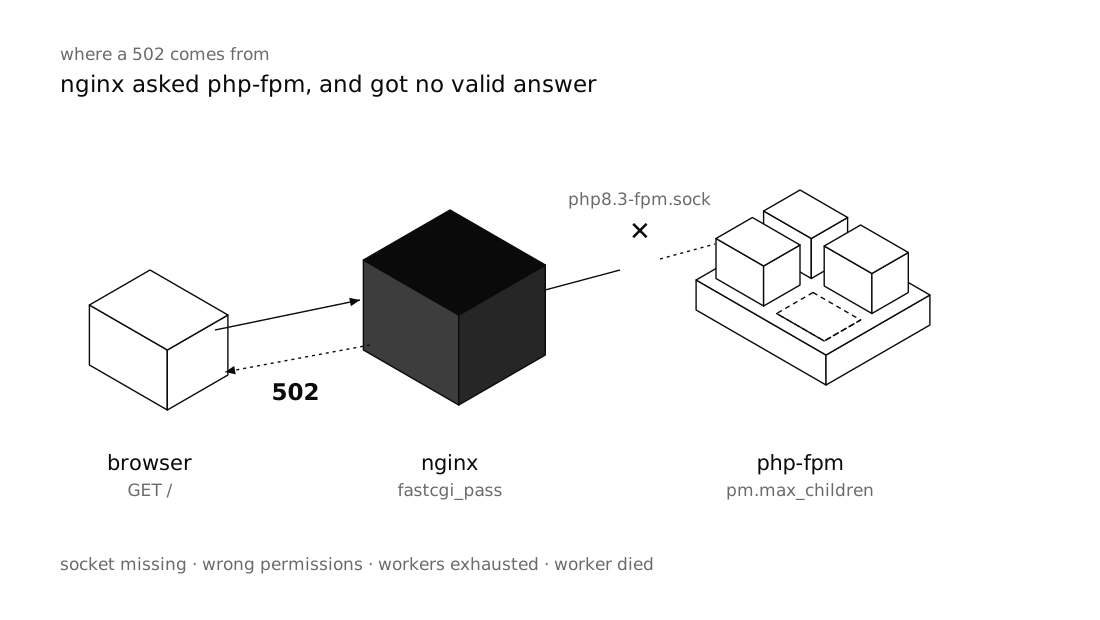
A 502 Bad Gateway from Nginx means Nginx handed the request to PHP-FPM and never got a valid response back. Either it couldn't connect at all (the socket is missing, it lacks permission, the service is down), or it connected and the PHP worker died before finishing. Nginx itself is usually fine; the problem is the connection or PHP-FPM.
Don't guess. Start with the last lines of /var/log/nginx/error.log: there is almost always one specific line that names the cause. This guide follows that path step by step: the Nginx log, PHP-FPM status and log, socket path and permissions, worker limits, timeouts and buffers. Examples assume Ubuntu 24.04 and PHP 8.3.
Short answer: A 502 in Nginx with PHP-FPM means Nginx did not get a valid response from PHP-FPM. Run
sudo tail -n 50 /var/log/nginx/error.logto find out why: usually PHP-FPM is stopped, thefastcgi_passpath doesn't match the pool'slisten, the Nginx user can't write to the socket, or a worker died mid-request. Fix the config, validate it withsudo nginx -t, and apply it withsystemctl reload.
What a 502 actually means
In this setup Nginx doesn't run PHP itself. Every request for a .php file is passed to PHP-FPM over FastCGI via fastcgi_pass, and Nginx waits for the reply. A 502 means that hand-off failed.
Don't confuse it with its neighbours:
- 504 Gateway Timeout: the connection succeeded, but PHP-FPM didn't answer within
fastcgi_read_timeout. PHP is alive, just slow. - 500 Internal Server Error: PHP-FPM did answer, but the answer is an error, such as a fatal error in your code that PHP turns into a 500 response.
So a 502 means "no response, or a broken one", not "a late response" and not "an error response".
Step 1: Read error.log
sudo tail -n 50 /var/log/nginx/error.log
# or follow it live while you reload the page in a browser:
sudo tail -f /var/log/nginx/error.log
If your server block defines its own error_log, read that file instead. For a 502, the line you care about is almost always one of these:
| Message in error.log | Cause | Fix |
|---|---|---|
connect() to unix:/run/php/php8.3-fpm.sock failed (2: No such file or directory) |
The socket file doesn't exist: PHP-FPM is stopped, or fastcgi_pass and the pool's listen point to different paths |
Start the service and make the two paths match |
connect() to unix:/run/php/php8.3-fpm.sock failed (13: Permission denied) |
The Nginx user can't write to the socket | Align listen.owner, listen.group and listen.mode with the Nginx user |
connect() failed (111: Connection refused) |
Nothing is listening on that address: PHP-FPM is on another port or down, or a stale socket file is left with no process behind it | Check the listen address and restart PHP-FPM |
connect() to unix:... failed (11: Resource temporarily unavailable) |
All workers are busy and the socket's connection backlog is full | Size pm.max_children to your RAM and find the slow requests |
upstream prematurely closed connection while reading response header from upstream |
The worker died mid-request: request_terminate_timeout, the OOM killer, or a segfault |
Read the PHP-FPM log and fix whatever is killing workers |
upstream sent too big header while reading response header from upstream |
Response headers (usually large cookies) don't fit in Nginx's buffer | Increase fastcgi_buffer_size and fastcgi_buffers |
upstream timed out (110: Connection timed out) while reading response header from upstream |
This one belongs to a 504, not a 502 | See the timeouts section |
Step 2: Is PHP-FPM even running?
systemctl status php8.3-fpm
sudo journalctl -u php8.3-fpm -n 50 --no-pager
sudo tail -n 50 /var/log/php8.3-fpm.log
If the service is failed, a config error in a pool file or php.ini is usually stopping it from starting. Test the PHP-FPM configuration on its own, then start it:
sudo php-fpm8.3 -t
sudo systemctl restart php8.3-fpm
A classic trap: after upgrading PHP (say from 8.2 to 8.3) the old service is removed or stopped, but the Nginx config still points to php8.2-fpm.sock. Run ls /run/php/ to see which sockets actually exist. If systemd units and journalctl are new to you, Creating a systemd service covers the basics.
Step 3: Make the socket path match on both sides
Nginx and PHP-FPM must agree on one address. Ubuntu's default pool looks like this:
[www]
user = www-data
group = www-data

listen = /run/php/php8.3-fpm.sock
listen.owner = www-data
listen.group = www-data
listen.mode = 0660

pm = dynamic
pm.max_children = 10
pm.start_servers = 3
pm.min_spare_servers = 2
pm.max_spare_servers = 4
pm.max_requests = 500

request_terminate_timeout = 120s
On the Nginx side, a minimal, correct server block for a PHP app (Laravel, for example):
server {
    listen 80;
    server_name example.com;
    root /var/www/example.com/public;
    index index.php;

    location / {
        try_files $uri $uri/ /index.php?$query_string;
    }

    location ~ \.php$ {
        include snippets/fastcgi-php.conf;
        fastcgi_pass unix:/run/php/php8.3-fpm.sock;
        fastcgi_read_timeout 120s;
    }

    location ~ /\.(?!well-known) {
        deny all;
    }
}snippets/fastcgi-php.conf, which ships with Ubuntu's Nginx package, sets SCRIPT_FILENAME and the other FastCGI parameters, and uses try_files to refuse non-existent scripts. The value of fastcgi_pass must be exactly the pool's listen. If PHP-FPM listens on TCP (listen = 127.0.0.1:9000), Nginx needs fastcgi_pass 127.0.0.1:9000;.
Step 4: Socket permissions
A Unix socket is a file, and Nginx needs write permission on it to connect. Check which user Nginx runs as and who owns the socket:
grep -E '^\s*user' /etc/nginx/nginx.conf      # on Ubuntu: user www-data;
ls -l /run/php/php8.3-fpm.sock
# srw-rw---- 1 www-data www-data 0 ... /run/php/php8.3-fpm.sock
13: Permission denied usually shows up after someone changes the pool's user to, say, deploy and changes listen.owner and listen.group along with it. They are separate settings: user decides which account runs your PHP code, while listen.owner/listen.group decide who may connect to the socket. They can differ; you just need listen.owner or listen.group to be the Nginx user, with listen.mode = 0660. If listen.acl_users or listen.acl_groups is set, it overrides owner and group, so check those too.
PHP-FPM recreates the socket on every restart, so a manual chmod on the socket file is not a fix. Change the pool file instead.
Step 5: Workers exhausted or dying
Hitting pm.max_children
If the 502 only appears under load or at peak hours, search the PHP-FPM log for this:
sudo grep -i 'max_children' /var/log/php8.3-fpm.log | tail
# WARNING: [pool www] server reached pm.max_children setting (10), consider raising it
Every worker is busy and new requests queue up. When the queue fills, Nginx returns 502; when requests sit in it too long, 504.
Raising pm.max_children blindly is dangerous: each worker holds memory, and when RAM runs out the server starts swapping or the OOM killer starts killing processes. Size it from memory instead: measure the average worker size and divide the RAM you can give PHP by it.
ps --no-headers -o rss -C php-fpm8.3 | awk '{s+=$1; n++} END {printf "%d workers, avg %.0f MB\n", n, s/n/1024}'If the average is 60 MB and you can spare 1.2 GB for PHP, about 20 workers is a sensible ceiling. If workers are always busy, the real problem is usually slow requests (heavy queries, external API calls with no timeout). Move long work to a queue (Laravel queues) and monitor resource usage.
Workers dying mid-request
upstream prematurely closed connection means the connection was established but the PHP process went away before sending a complete response. The PHP-FPM log usually says why:
WARNING: [pool www] child 2481, script '/var/www/example.com/public/index.php' (request: "GET /index.php") execution timed out (120.08 sec), terminating
WARNING: [pool www] child 2481 exited on signal 9 (SIGKILL) after 130.52 sec from start
WARNING: [pool www] child 2533 exited on signal 11 (SIGSEGV) after 3.10 sec from start- execution timed out ... terminating: the request ran past
request_terminate_timeoutand PHP-FPM killed the worker. - signal 9 with no timeout message: usually the kernel's OOM killer. Confirm with
sudo dmesg -T | grep -i -E 'killed process|out of memory'. - signal 11 (SIGSEGV): PHP or an extension crashed. Look at recently installed extensions and OPcache.
Fatal errors and memory_limit
An ordinary fatal error such as Allowed memory size of ... bytes exhausted or Maximum execution time exceeded usually ends in a 500 or a blank page, not a 502, because PHP handles the error and still returns a response. Look for these in the PHP log or your application log (storage/logs in Laravel). Memory turns into a 502 when memory_limit is huge or -1: PHP never hits its own limit, the server runs out of RAM, and the OOM killer takes the worker. A sensible memory_limit (e.g. 256M) buys you a readable error instead of a silent dead process.
Step 6: Timeouts, and where 502 ends and 504 begins
Three independent settings limit how long a request can live:
| Setting | Where | Default | When it runs out |
|---|---|---|---|
fastcgi_read_timeout |
Nginx | 60s | Nginx stops waiting and returns 504 |
request_terminate_timeout |
PHP-FPM pool file | 0 (disabled) | The worker is killed and Nginx returns 502 |
max_execution_time |
php.ini |
30 (under FPM) | PHP fatal error, usually a 500 |
Rule of thumb: max_execution_time < request_terminate_timeout ≤ fastcgi_read_timeout. That way a slow script is stopped first by a traceable PHP error, request_terminate_timeout is only a safety net for code stuck in system calls (on Linux, time spent waiting on the database or network doesn't count towards max_execution_time), and Nginx never gives up before PHP does.
If the real error is a 504, raising timeouts only treats the symptom. A request that takes more than a minute belongs in a background job, not in the web request cycle.
Step 7: Big headers and buffers
upstream sent too big header means PHP's response headers don't fit in Nginx's first buffer. The usual suspects are oversized session cookies, many Set-Cookie headers, or debug headers. Enlarge the buffers in the same location ~ \.php$ block:
location ~ \.php$ {
    include snippets/fastcgi-php.conf;
    fastcgi_pass unix:/run/php/php8.3-fpm.sock;

    fastcgi_buffer_size 32k;
    fastcgi_buffers 16 16k;
}
fastcgi_buffer_size is the buffer that holds the status line and headers (4k or 8k by default, depending on the platform); fastcgi_buffers holds the response body. Don't inflate these without reason, since memory is reserved per concurrent connection. If headers keep growing, find out why the app sends so many cookies.
Final step: Test and apply
Test every change before applying it. reload doesn't drop active connections, and if the new config is broken Nginx keeps running on the old one:
sudo nginx -t && sudo systemctl reload nginx
sudo php-fpm8.3 -t && sudo systemctl reload php8.3-fpm
Then reload the page with tail -f running on error.log. If the message changes, you've made progress; go back to the table and continue.
Frequently asked questions
Why does the 502 error come and go?
An intermittent 502 usually means PHP-FPM can't keep up under load: it hits pm.max_children, a worker is killed for lack of RAM, or a particular request exceeds request_terminate_timeout. Read the PHP-FPM log for the times the errors occurred.
What is the difference between 502 and 504 in Nginx?
A 502 means Nginx never got a valid response from PHP-FPM, for example because it couldn't connect or the worker died mid-request. A 504 means it connected but the response didn't arrive within fastcgi_read_timeout.
Does restarting PHP-FPM fix a 502?
If the service crashed or left a stale socket behind, yes, for now. If the cause is too few workers, memory pressure or slow code, the error will return; a restart only buys time to find the cause in the logs.
Should PHP-FPM use a Unix socket or a TCP port?
When Nginx and PHP-FPM run on the same server, a Unix socket is simpler, slightly lighter and not reachable from outside. Use TCP when PHP-FPM runs on another machine or in another container.
How do I find out which user Nginx runs as?
Check the user directive in /etc/nginx/nginx.conf, or run ps -o user,cmd -C nginx to see the owner of the worker processes. On Ubuntu it is www-data.
Wrap-up
A 502 from Nginx with PHP-FPM always means it failed to get a response from PHP-FPM, and error.log almost always tells you which failure. Keep the order: the log message, service status and PHP-FPM log, matching socket paths, socket permissions, worker count and health, timeouts, and finally buffers. Test every change with nginx -t and php-fpm8.3 -t, apply it with reload, and if the error only appears under load, look at memory and slow requests rather than blindly raising limits.